calendar history
Restore campaign prices
Learn how to restore campaign prices with a safe Juniper & Trail example, shopper impact, options, and recovery checks. Full restore uses the pre-campaign snapshot. Review drift before applying a restore because a merchant edit made during the campaign may be newer than the snapshot.
Before you begin
- Open the correct shop and campaign
- Know the campaign's discount route
- Do not overwrite a legitimate newer merchant edit without review
Confirm the shop, current status, and intended consequence before changing anything. Use read-only status, preview, or history evidence first.
Step-by-step setup
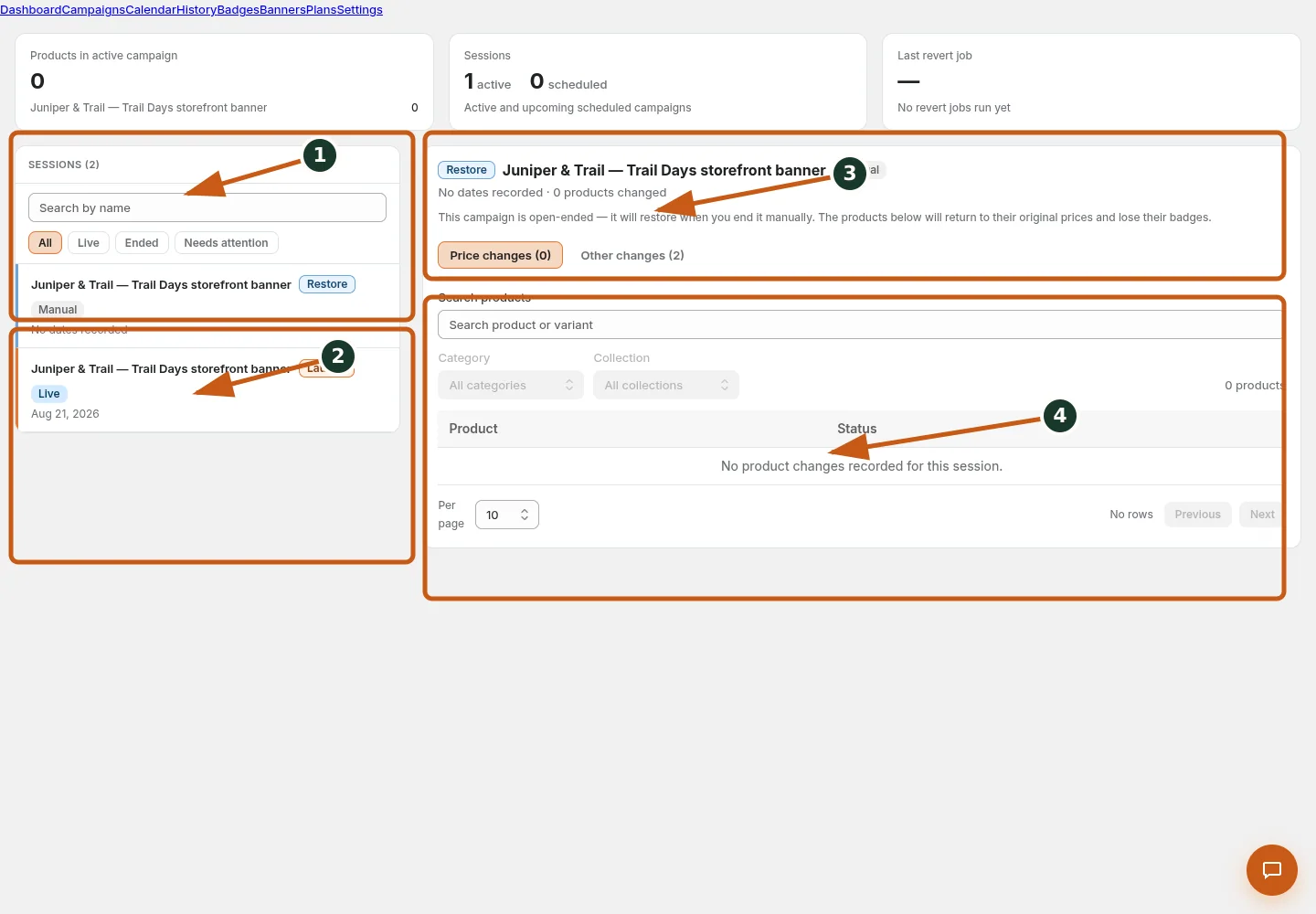
Search campaign sessions and filter them by lifecycle or attention status.
Select a session and use its available restore or launch action.
Review the selected session, restore mode, and recorded price changes.
Search product snapshots and inspect restore status row by row.
- Open an ended or eligible campaign History session for the intended shop and confirm the current record and status.
- Open Restore, review unrestored price/label/Markets counts and preflight warnings, then choose the offered scope.
- Read the inline summary, warning, or preflight before submitting; do not repeat a command while background work is running.
- Verify remaining unrestored and parked counts; a partial run does not imply complete status.
- Confirm the resulting status and History/audit evidence, then spot-check Shopify or the storefront when the action has external effects.
Full restore uses the pre-campaign snapshot. Review drift before applying a restore because a merchant edit made during the campaign may be newer than the snapshot.
Juniper & Trail example
Juniper & Trail uses restore campaign prices to inspect the Weekend Trail Kit occurrence and compares the recorded snapshot with the current Shopify value before any recovery action. The documentation fixture uses realistic products, inventory states, variants, collections, and protected exclusions so the preview exercises the same decisions as a merchant catalog.
What shoppers will see
History itself is not shopper-facing, but restore choices determine whether current storefront prices and campaign elements change. Check the relevant result from product through cart where applicable. For shopper-facing work, compare desktop and mobile and verify both an eligible and an ineligible item.
Common mistakes and troubleshooting
- Acting on the wrong shop. Confirm the Shopify store and campaign before following Restore campaign prices.
- Trusting a stale preview. Refresh after catalog, schedule, discount, theme, locale, or market changes.
- Repeating a background command. Read status and History first; retry only when Badgy presents a recoverable failure.
- Skipping the consequence check. Confirm what changes for shoppers and what the end or restore path will do.
If the status reports revoked authorization, reconnect Shopify before retrying. If the result still differs from the preview, preserve the campaign ID and approximate time, then open support from this identified shop. Never send customer data, access tokens, or full catalog exports in feedback.
Related guides
Options reference
| Option | Use it when | Consequence | | --- | --- | --- | | Prices | Restore snapshot prices | Drift/overlap safeguards apply | | Labels | Remove/rebuild campaign badge state | Surviving campaign badges remain | | Selective | Restore chosen rows/dimensions | Status can remain unchanged | | Full eligible restore | No work remains | Can transition terminal status |
Badgy behavior in this guide is reviewed against the repository's shipped UI, service rules, and feature design documents. Shopify-owned theme, Markets, Flow, billing, and discount behavior can also depend on the store's Shopify configuration; consult the Shopify Help Center for that platform configuration.