discounts pricing
Review discounted-price previews
Learn how to review discounted-price previews with a safe Juniper & Trail example, shopper impact, options, and recovery checks. Preview representative low, typical, and high prices plus eligible and ineligible carts. Confirm compare-at values for direct price changes and code, tier, or BOGO qualification for Shopify-calculated routes.
Before you begin
- Choose the shopper behavior: visible price, code, quantity tiers, or BOGO
- Confirm eligible products and markets
- Define the intended revert outcome
Keep the campaign in Draft while you verify the configuration. Use a private storefront window where the guide changes shopper-facing behavior.
Step-by-step setup
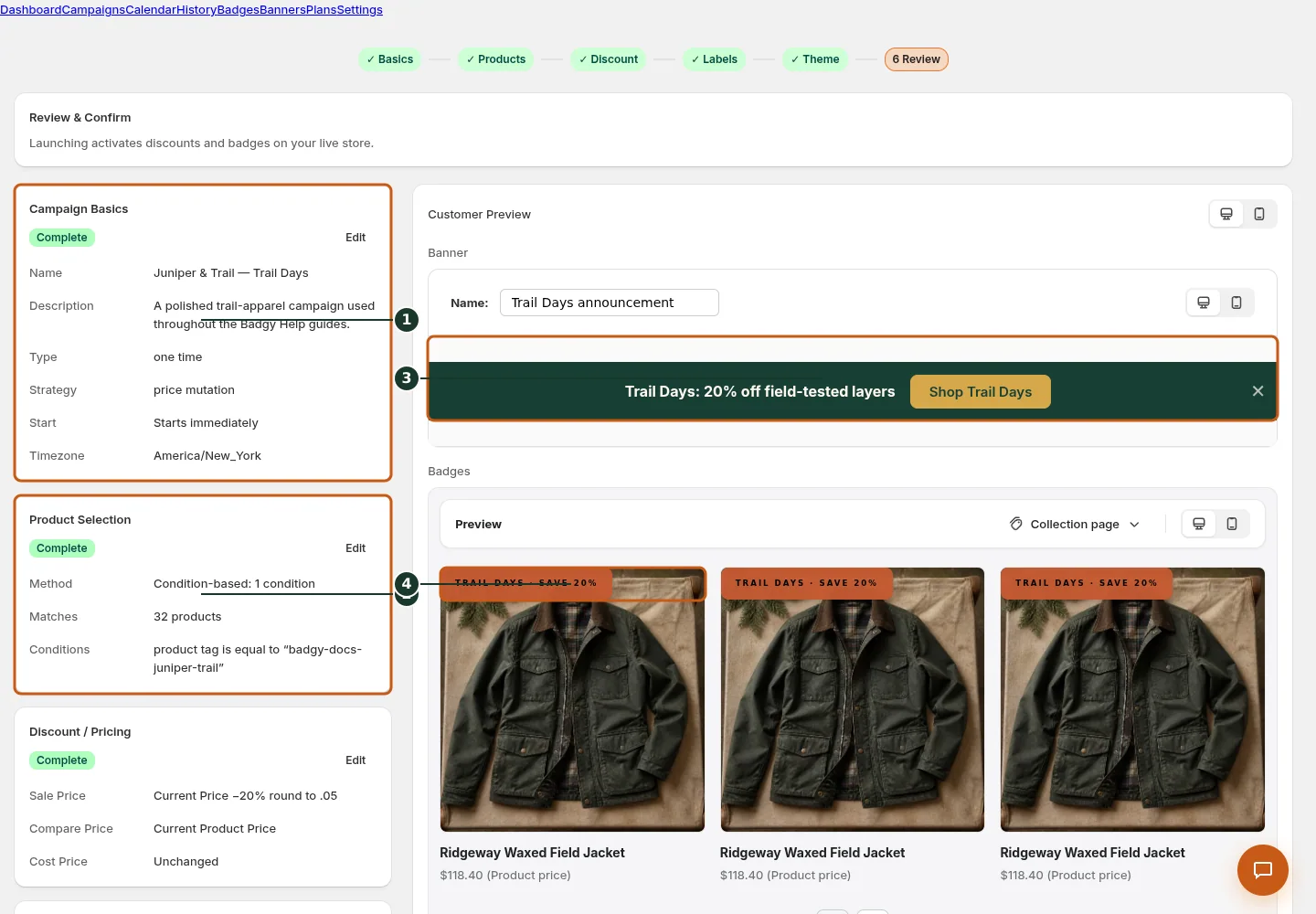
Review campaign identity, timing, and timezone; use Edit to correct them.
Confirm the product rule and matching product count.
Check the final banner and badge customer preview.
Verify the selected badge appearance on product cards.
- Complete the Products step so preview has a current resolved scope.
- For direct price, inspect old and computed Price, Compare-at, and Cost columns across preview pages.
- For code, verify type, value, code, limits, and campaign validity window.
- For Volume or BOGO, use the upsell preview and test threshold quantities in a storefront cart.
- Retry a failed preview, resolve no-product/no-op warnings, and refresh after changing selector or formula.
Preview representative low, typical, and high prices plus eligible and ineligible carts. Confirm compare-at values for direct price changes and code, tier, or BOGO qualification for Shopify-calculated routes.
Juniper & Trail example
Juniper & Trail tests the workflow for Review discounted-price previews on the Alder 18L Daypack and Roam 750 Steel Bottle. The team checks the product, cart, and restore consequences before launch. The documentation fixture uses realistic products, inventory states, variants, collections, and protected exclusions so the preview exercises the same decisions as a merchant catalog.
What shoppers will see
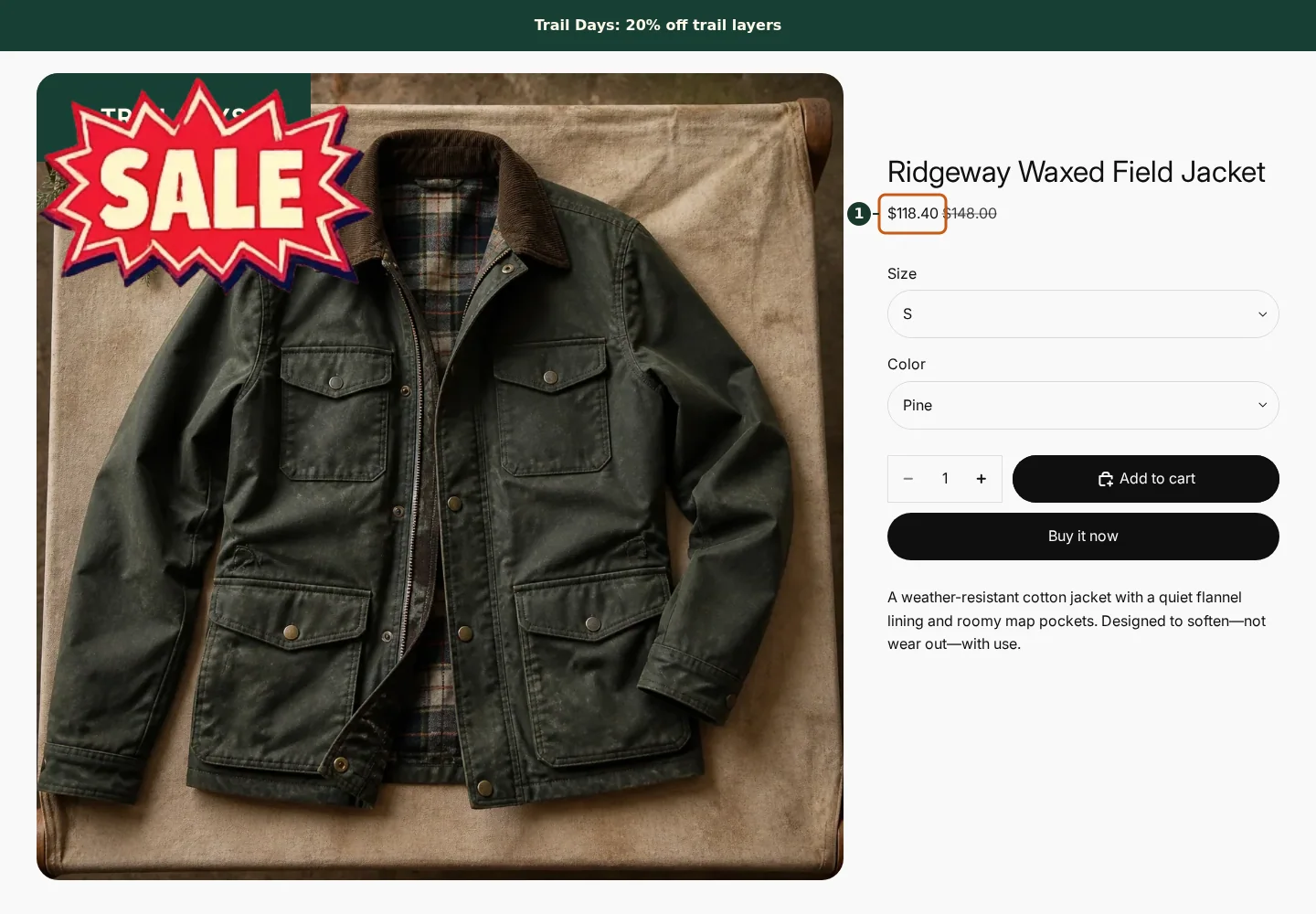
Confirm the campaign announcement and Shop call to action at the top of the store.
Check the badge and adjusted pricing on an eligible product card.
Compare another product card to verify consistent campaign treatment.
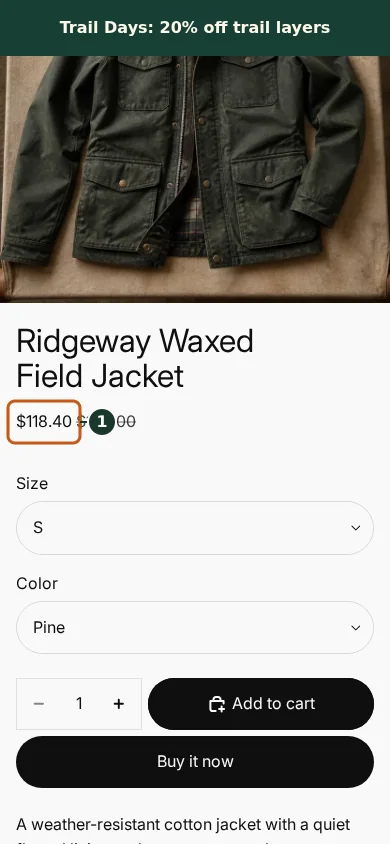
Confirm the campaign announcement and Shop call to action fit the mobile header.
Check that the badge remains readable on the mobile product card.
Scroll through additional products to verify the collection layout stays usable.
The cart outcome depends on the route: direct price changes catalog prices, while code and function-backed offers are calculated by Shopify when eligibility is met. Check the relevant result from product through cart where applicable. For shopper-facing work, compare desktop and mobile and verify both an eligible and an ineligible item.
Common mistakes and troubleshooting
- Acting on the wrong shop. Confirm the Shopify store and campaign before following Review discounted-price previews.
- Trusting a stale preview. Refresh after catalog, schedule, discount, theme, locale, or market changes.
- Repeating a background command. Read status and History first; retry only when Badgy presents a recoverable failure.
- Skipping the consequence check. Confirm what changes for shoppers and what the end or restore path will do.
If the status reports revoked authorization, reconnect Shopify before retrying. If the result still differs from the preview, preserve the campaign ID and approximate time, then open support from this identified shop. Never send customer data, access tokens, or full catalog exports in feedback.
Related guides
Options reference
| Option | Use it when | Consequence | | --- | --- | --- | | Product table | Direct-price calculations | Paginated current catalog evidence | | Route summary | Code configuration | Does not prove checkout until tested | | Upsell block | Volume/BOGO rows | Shows shopper ladder | | Cart test | Function/code eligibility | Required for final consequence check |
Badgy behavior in this guide is reviewed against the repository's shipped UI, service rules, and feature design documents. Shopify-owned theme, Markets, Flow, billing, and discount behavior can also depend on the store's Shopify configuration; consult the Shopify Help Center for that platform configuration.